
Most service businesses have a Google Business Profile. Few have one that’s actually working hard for them.
There’s a big gap between “set up” and “optimized,” and that gap is usually responsible for why one HVAC company shows up first in the map pack while another just as good, just as experienced is buried on page two. This guide walks through google business profile optimization the way we approach it for our own clients: methodically, with the details that actually affect your ranking.
Why Your Google Business Profile Matters More Than Your Website for Local Search
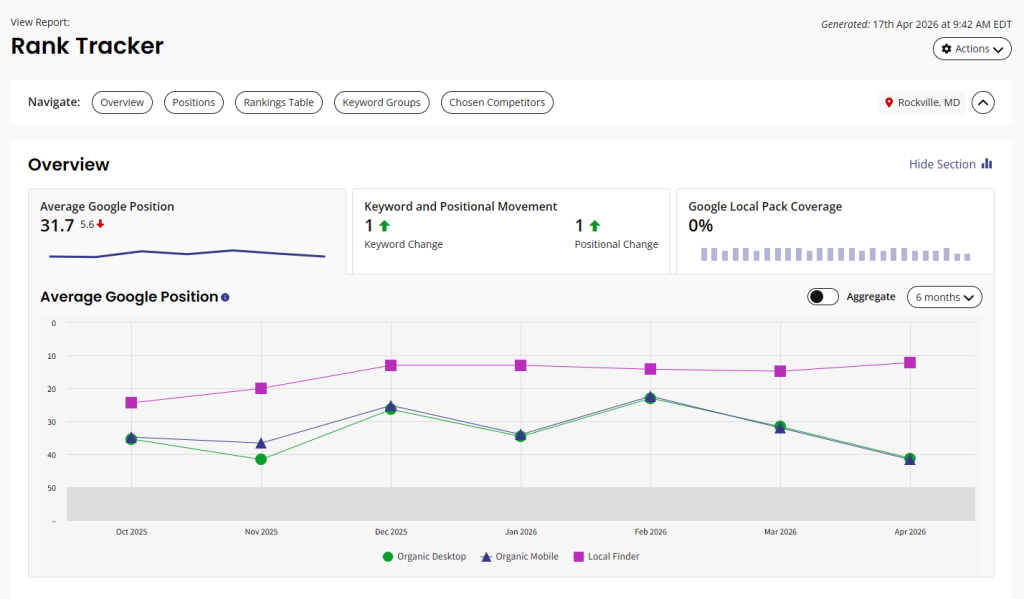
When someone searches “plumber near me” or “HVAC repair [city],” Google shows the map pack before any organic results. That map pack pulls entirely from Google Business Profile data. Your website barely factors in at this stage.
We’ve seen clients with beautifully designed websites ranking in the middle of page one organically, but their GBP was so thin that they were invisible in the map pack — which is where most of the actual clicks happen for local searches. Fix the GBP first. The website matters for everything else, but the map pack runs on your profile.
The Google Business Profile Optimization Checklist
Work through these in order. The early items have the biggest impact on ranking; the later ones compound over time.
Start With Your Business Information
Everything in your profile needs to match everything everywhere else on the internet. Your name, address, and phone number should be identical character for character on your GBP, your website, Yelp, the BBB, and every other directory you’re listed in.
Google calls this NAP consistency (Name, Address, Phone), and inconsistencies send a signal that your business information is unreliable. “ABC Plumbing LLC” and “ABC Plumbing” look like different businesses to Google’s systems.
While you’re in there, make sure your business hours are accurate and updated for holidays. A closed sign when Google says you’re open is the fastest way to tank your reviews and trust signals simultaneously.
Choose Your Categories Carefully
Your primary category is the most important ranking factor in your profile. It should describe what your business does at the most specific level possible. “Plumber” is better than “Contractor.” “HVAC Contractor” is better than “Home Services.”
Secondary categories matter too, you can add up to 9. A roofing company might list Roofing Contractor as primary and add Gutter Cleaning Service, Roof Repair Service, and Siding Contractor as secondary categories. Each secondary category opens up new search queries you can rank for.
One thing we see constantly: service businesses using overly broad primary categories because they do a lot of different things. Resist the urge. Google’s local algorithm rewards specificity. Pick the one thing you most want to be known for and make that your primary.
Write a Business Description That Does Something
The business description field is 750 characters. Most businesses either leave it blank or stuff it with keywords until it reads like a robot wrote it.
Do neither.
Write 2-3 paragraphs that explain what you do, who you serve, and why you’re different. Include your primary service keyword naturally (once is enough), name your service area, and mention one or two things that actually differentiate you. “Family-owned since 1987” or “Serving the Dallas metro for 15 years” or “24/7 emergency response” concrete details that help customers make a decision.
The description doesn’t directly affect your ranking, but it affects whether someone calls you once they find you.
Photos: More Than You Think, Better Than You Think
Google’s research shows that profiles with photos receive 42% more requests for directions and 35% more click-throughs to websites than profiles without them.
More importantly, photo activity is a ranking signal. Regularly adding new photos signals that your business is active. For service businesses, the best photos are:
- Your crew on a job (shows real people doing real work)
- Before/after shots from recent jobs
- Your service vehicles (builds brand recognition)
- Your physical location, if you have one customers visit
- The owner or team (people like knowing who they’re hiring)
Aim for at least 15-20 photos to start, then add a few new ones every month. Phone photos from real jobs outperform stock images every time.
GBP Posts: The Feature Most Service Businesses Ignore
Google Business Profile posts let you publish updates, offers, events, and announcements directly to your profile. They show up prominently in your profile view and, in some cases, in local search results.
Most service businesses have never posted once.
Posts are a quick-win ranking signal because so few competitors are using them. We recommend one post per week for most service businesses. Posts expire after 7 days, so weekly keeps your profile looking active.
What to post? Seasonal promotions (“Spring AC tune-up special — $59 through May”), completed project highlights (“Just finished a full kitchen remodel in [neighborhood] here’s how it turned out”), or educational tips (“3 signs your water heater is about to fail”). Keep them short, include a photo when you have one, and add a call to action.
Don’t overthink it. An imperfect post published consistently beats a perfect post that never goes live.
How to Actually Get More Reviews
Reviews are arguably the most powerful ranking signal in local search, and they’re also the hardest to get consistently. Here’s what actually works.
Ask at the right moment. The best time to ask for a review is right when the job is done and the customer is happy and not three days later via email. Train your technicians or office staff to say: “If you’re happy with the work, we’d really appreciate a Google review. It takes about 90 seconds and helps us a lot. I can send you the link right now.” Then text them the link.
Make it frictionless. Create a short URL or QR code that goes directly to your review form. Tools like Whitespark and BrightLocal can generate these. Put the QR code on your business cards, invoices, and vehicle wraps.
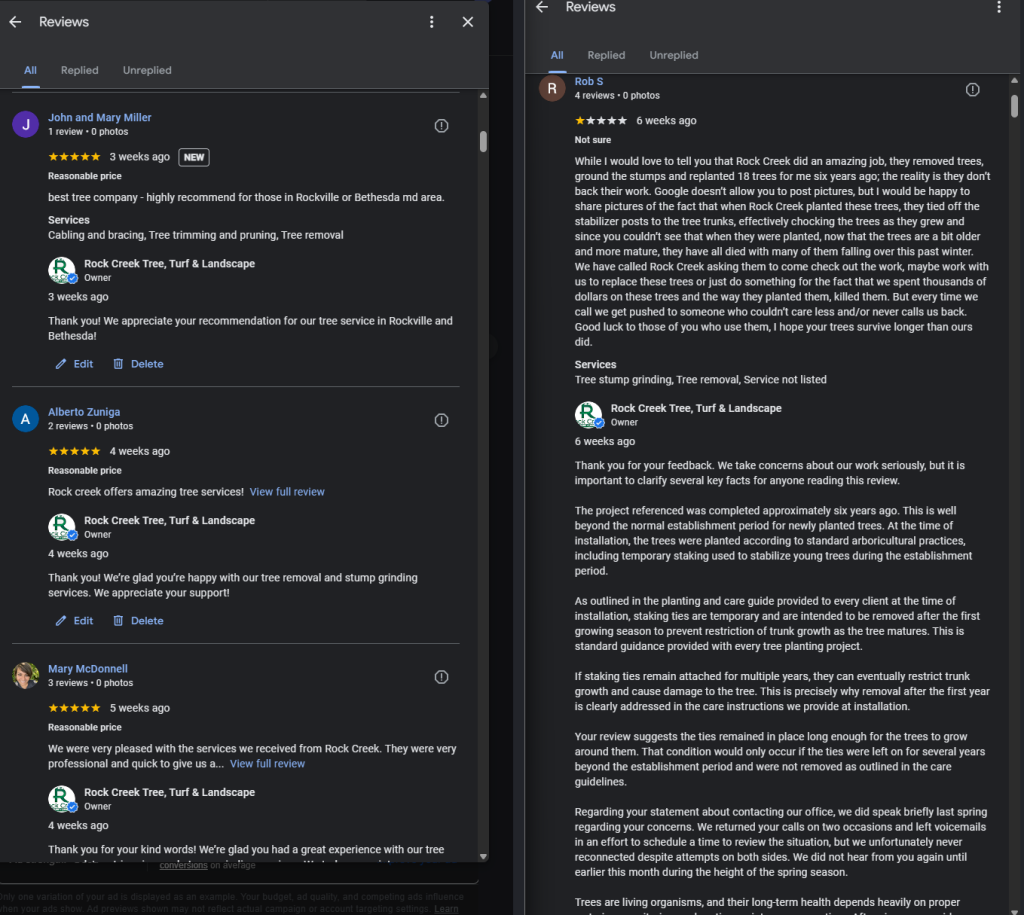
Respond to every review. Responding to reviews good and bad signals to Google that you’re engaged with your customers. For positive reviews, a brief personalized thank-you (mention what the job was, if you know) works great. For negative reviews, respond professionally without getting defensive. Future customers read your responses more carefully than the reviews themselves.
A realistic goal for most service businesses: 2-4 new reviews per month. That’s enough to steadily accumulate reviews and maintain the freshness signal Google rewards.
Seed Your Q&A Section
Most business owners don’t realize they can ask and answer their own questions in the GBP Q&A section. Google lets anyone ask a question, and anyone can answer, including you.
Get ahead of it. Think about the 5-7 questions you get most often from customers, write them as questions in your Q&A, and answer them yourself. “Do you offer free estimates?” “Are you licensed and insured?” “What areas do you serve?” “Do you offer financing?” These are questions potential customers want answered before they call.
Left unattended, competitors or anyone else can post inaccurate answers in your Q&A. Seeding it with your own content keeps control in your hands.
Track Your Local Ranking Progress
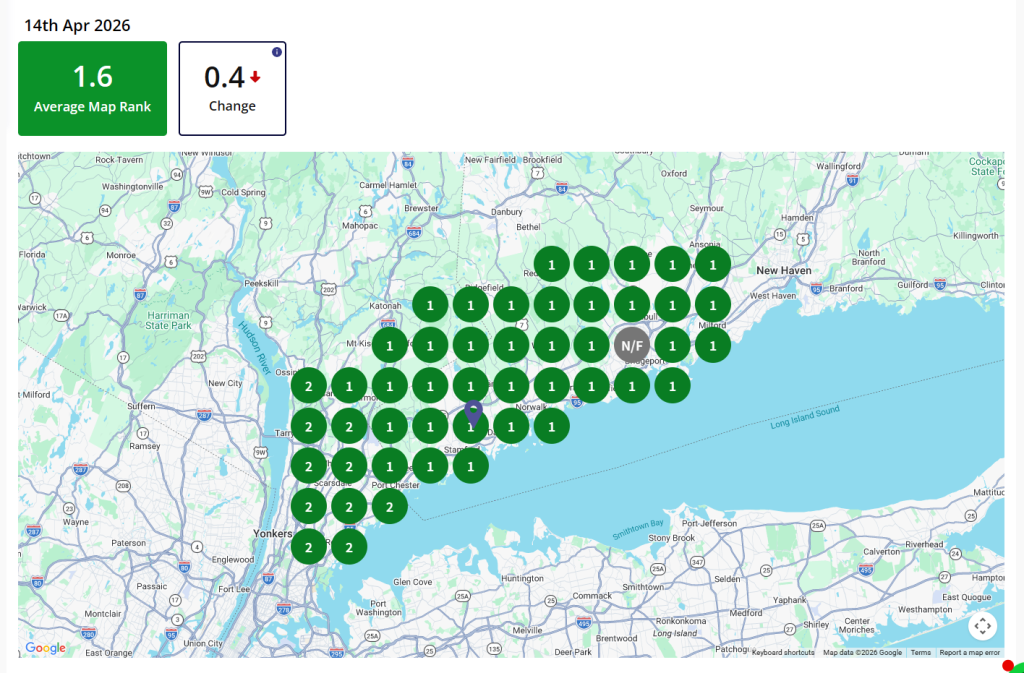
Google Business Profile Insights gives you some useful data (calls, direction requests, website visits), but it doesn’t show you how you’re ranking across your service area. For that, you need a local rank tracking tool.
BrightLocal and Whitespark both have tools that show you a geo-grid map of your service area with your GBP ranking at dozens of different points. You’ll see that you might rank #1 within 2 miles of your address but drop to #8 at the edges of your service area. That’s normal. The geo-grid tells you where to focus your optimization efforts.
Check your rankings monthly. Major changes usually take 4-6 weeks to show up after you make profile updates, so don’t expect overnight results but do expect steady improvement if you’re working through this checklist consistently.
The Ongoing Work
Google Business Profile optimization isn’t a one-time task. The businesses that dominate the map pack in their markets treat their GBP like they treat their social media: they’re in there regularly, adding photos, posting updates, responding to reviews, and adjusting their strategy based on what the data shows.
If you work through this checklist thoroughly and maintain it consistently, you should start seeing meaningful ranking improvement within 60-90 days. The caveat: if you’re in a very competitive market (major metros, high-competition services like personal injury law or cosmetic dentistry), you’ll also need to build local citations, earn backlinks, and potentially run paid search alongside your organic efforts.
For most service businesses in small-to-mid-size markets, though, a well-optimized Google Ads for local service businesses complement is the single highest-ROI thing you can do in local marketing alongside a well-optimized Google Business Profile. It costs nothing but time, it’s sustainable, and the leads it generates are high-intent customers who are already looking for what you do.
If you want a second set of eyes on your GBP or help building out your local SEO strategy, we’re happy to take a look, no pitch, no pressure, just honest feedback on what’s working and what isn’t.
