
A plumbing client came to us in February spending $4,800 a month on Google Ads. They were getting clicks. They were getting calls. They weren’t getting installs.
We pulled the search terms report on day two and found what most agencies pretend isn’t a problem. Roughly 38% of their spend was going to queries that had nothing to do with installing toilets, repiping bathrooms, or fixing a leak. Furnaces. DIY tutorials. Job applications. “How to unclog a drain with vinegar.”
That was the negative keyword list talking, and nobody was listening.
What we found in the search terms report
The first thing to understand about Google Ads is that what you bid on isn’t what you actually pay for. You bid on keywords. Google charges you for search terms, the actual phrases real people type. The two are not the same thing, and the gap between them is where most ad budgets bleed.
Bid on “plumber near me” with broad match, and you’ll pay for “free plumber online,” “plumber salary,” “plumber school near me,” and “how to be a plumber.” We’ve seen this on every account we’ve audited in the last two years. The only question is how bad the leak is.
For our plumbing client, the leak broke down like this.
- $612 spent on furnace and HVAC queries, which they don’t service
- $384 on DIY and how-to searches
- $241 on people looking for jobs at plumbing companies
- $310 on “free” and “cheap” modifiers
- $267 on warranty and recall searches for equipment brands they don’t carry
Total wasted spend, in one month, from one account. About $1,814. A little under 38% of the budget.
That’s not a budget problem. That’s a negative keyword problem.
What are negative keywords on Google Ads, exactly?
A negative keyword tells Google what not to show your ad for. Add “free” as a negative, and any search containing “free” is suppressed. Add “salary” and your ad won’t show to people researching their next career.
You can add negatives at three levels.
- Ad group level. Tightest control. Use this for negatives that only matter to one ad group, like blocking “drain cleaning” inside a “water heater installation” ad group.
- Campaign level. Most common. The “free, cheap, salary, jobs, DIY” list usually lives here.
- Account-level lists. Best for terms that should never trigger your ads anywhere. You build a list once and apply it to every campaign in your account. Cleaner than copy-pasting the same negatives into ten different campaigns.
The Google Ads docs cover the mechanics. They don’t tell you which negatives actually matter, which is the whole game.
First, we built the obvious-no list
Every account we manage starts with the same baseline negative keyword list. It isn’t glamorous. It just stops the most common money leaks before they start.
Here’s the baseline list, organized by category.
- Free, cheap, and DIY (“free”, “cheap”, “diy”, “do it yourself”, “how to”, “tutorial”, “youtube”, “reddit”)
- Job and career (“jobs”, “career”, “salary”, “hiring”, “wages”, “apprenticeship”, “training”, “school”, “certification”)
- Wrong-intent informational (“definition”, “meaning”, “examples”, “wikipedia”)
- Adjacent industries that overlap by mistake, which depends on the client. For a plumber, that’s often “plumbing supply”, “wholesale”, “manufacturer”, and product-name searches.
- Branded competitor terms, but only if you’ve decided not to bid on them defensively. That’s a separate strategic call.
Drop that list in at the account level the day a campaign goes live. You’ll save 5-15% of spend in the first week without doing anything else. We’ve never seen it not pay back.
Then we got picky about match types
Negative keyword match types matter as much as positive keyword match types. Most accounts get this wrong, including some accounts run by people who should know better.
There are three options.
- Negative broad match (free plumber). Suppresses ads when both words appear in the search, in any order, anywhere in the query. So this would block “I’m a free plumber” and “is a plumber free on weekends.”
- Negative phrase match (“free plumber”). Suppresses ads when the exact phrase appears, in that order. Catches “free plumber near me” but not “plumber free quote.”
- Negative exact match ([free plumber]). Suppresses ads only on that exact search, nothing else.
The mistake we see most often is people using negative exact match on broad concepts. Adding [free] as a negative exact match only blocks the literal one-word search “free.” It does not block “free estimate,” “is it free,” or “looking for a free option.” Use negative broad or negative phrase for concept blockers. Save negative exact for surgical removals, like a specific competitor’s branded search you bid on once and don’t want to again.
The fight over informational queries
This is where most negative keyword guides start sounding the same and stop being useful.
Informational queries (like “how does a tankless water heater work”) are tempting to block. They’re often a big chunk of bad spend. They’re also where customer journeys start. Block them all and you cut top-of-funnel demand. Block none of them and you bleed budget on tire-kickers.
Our rule for service businesses under $10K a month in ad spend is simple. Block all informational queries. You don’t have the budget to play long-funnel attribution games, and you need every click to be intent-loaded. The “how does a tankless work” search isn’t going to install a tankless from a $300 click. They’re researching for next year.
For accounts at $20K a month and up, with proper conversion tracking and a long enough sales cycle to attribute multi-touch, keep some informational queries open. Route them to a content-focused landing page or your blog, not your “get a quote” page.
For our plumbing client at $4.8K a month, we blocked all of it. “how”, “why”, “what is”, “tutorial”, “guide” all gone. Lead volume increased the next month, even though clicks dropped 22%. The clicks we kept were from people ready to buy.
How do I add negative keywords to my Google Ads campaign?
Walk through this once and it’ll take you ninety seconds the next time.
- Sign in to Google Ads.
- Go to the campaign or ad group where you want to add negatives.
- In the left menu, click “Audiences, keywords, and content,” then “Search keywords.”
- Above the table, click the “Negative keywords” tab.
- Click the blue “+” button.
- Choose ad group level, campaign level, or a list. Lists are reusable across campaigns.
- Type or paste your negatives, one per line. Wrap in quotes for phrase match, brackets for exact match. Plain text defaults to broad match.
- Save.
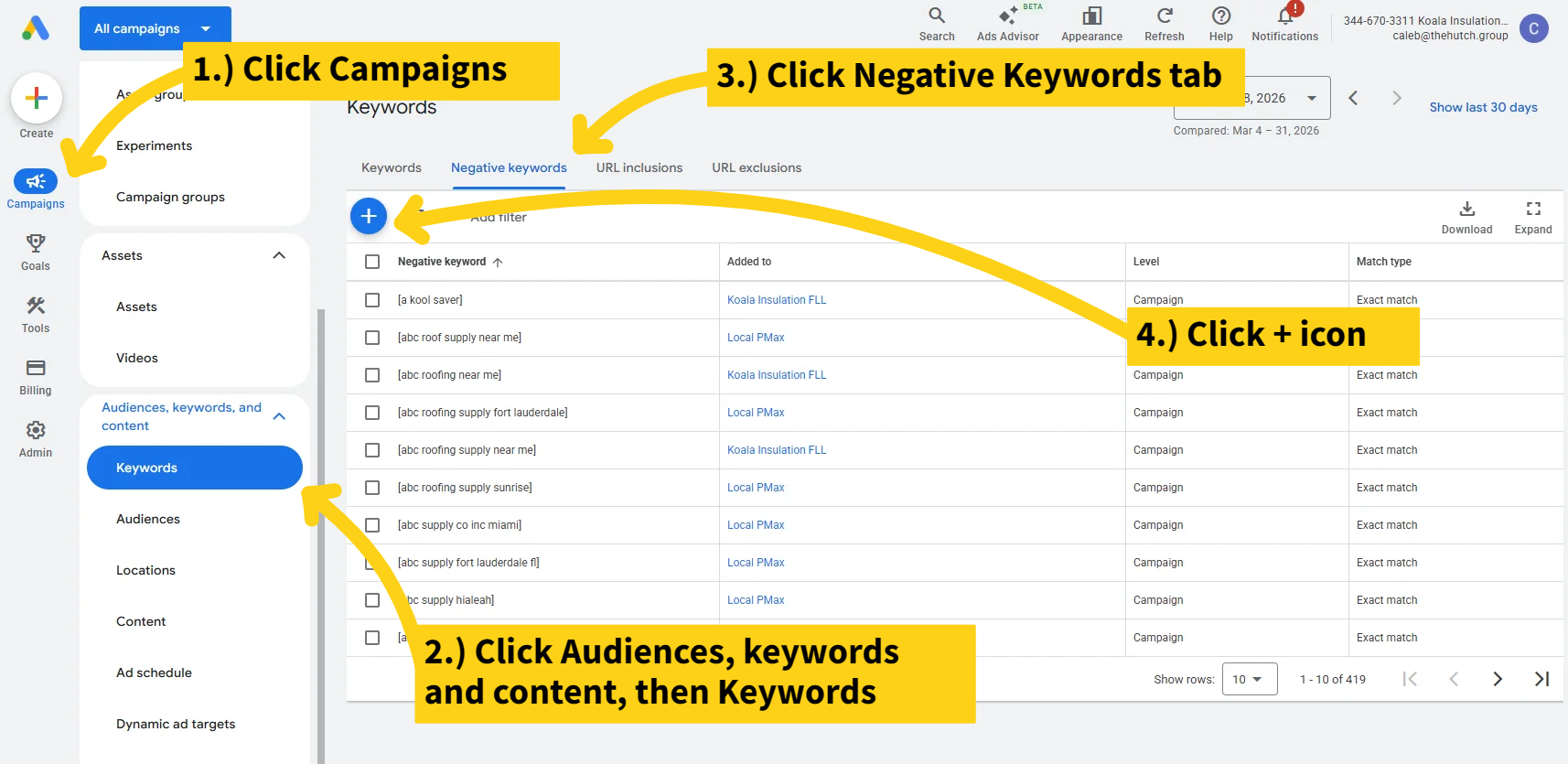
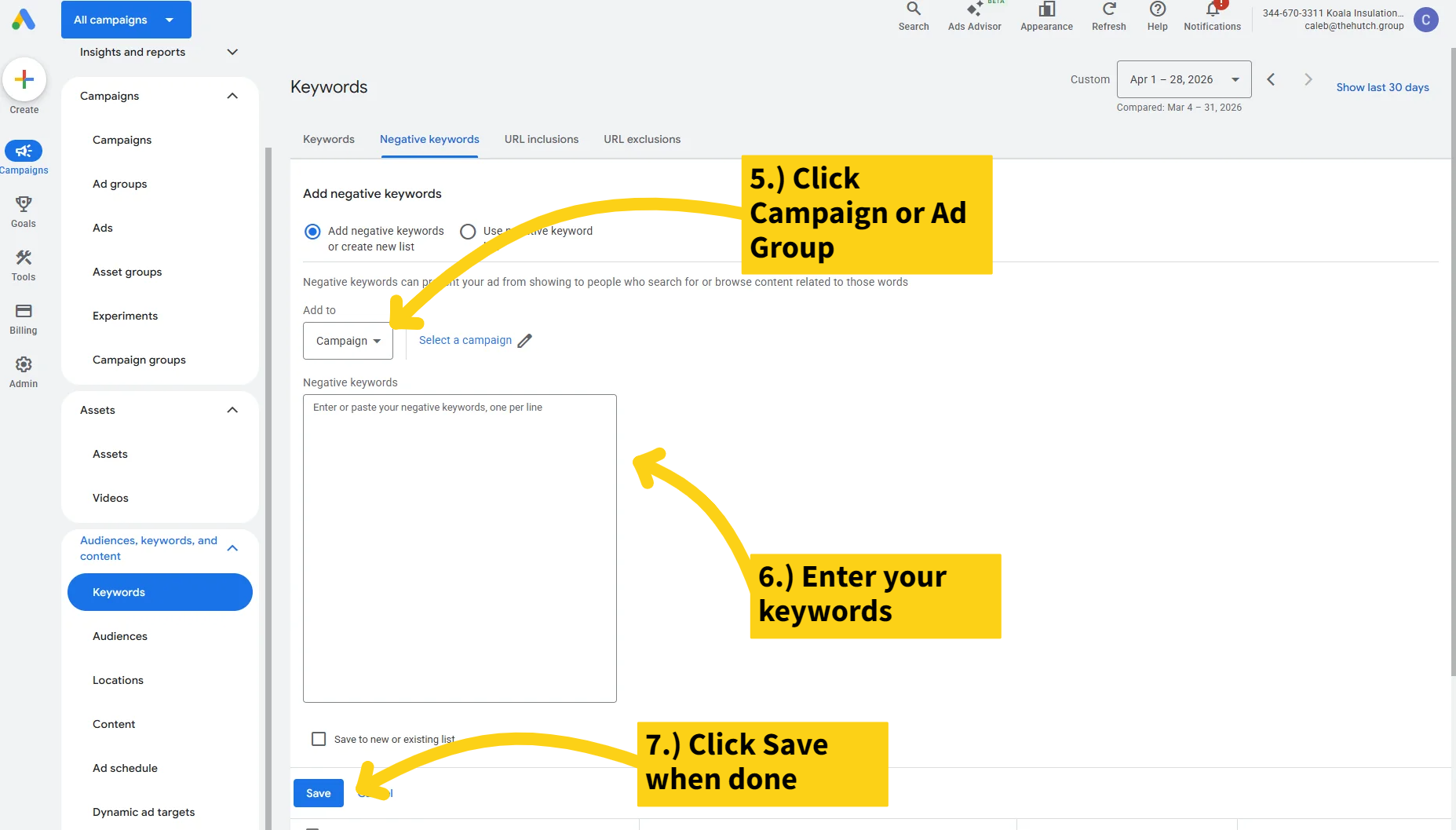
If you’re in the new Google Ads UI (which everyone is, as of late 2025), the “Negative keyword lists” page sits under “Tools and settings, then Shared library.” That’s where account-level lists live.
How to find negative keyword opportunities you don’t already know about
This is the part that separates accounts that hit a plateau from accounts that keep getting better.
Run this every two weeks, minimum.
- Open the Search terms report in the same “Audiences, keywords, and content” section.
- Set the date range to the last 30 days.
- Sort by cost, descending.
- Read the top 50 search terms. Read them. Don’t scan.
- For every term that looks irrelevant, expensive-with-no-conversions, or off-intent, click the checkbox.
- Above the table, click “Add as negative keyword.”
- Choose phrase or broad match thoughtfully (see the match types section above).
- Apply at the right level (ad group, campaign, or list).
Two passes a month catches almost everything. Most of our accounts settle into a rhythm where we add 3 to 8 new negatives per pass after the first 60 days. The first pass on a new account usually adds 50 to 200.
What is an example of a negative keyword that surprised us?
The phrase “near me” sometimes belongs in your negative keyword list.
That sounds insane. Local service businesses live and die on “near me” intent. Here’s the catch. If your campaign is already geo-targeted to a 25-mile radius, every search inside that radius is “near me” by definition. Adding “near me” as a positive keyword can pull traffic from the entire country if your match types are loose enough, even though Google says it shouldn’t. We’ve watched it happen on three different accounts.
The fix usually isn’t blocking “near me” outright. You’d cut real local intent. The fix is tightening your match types and your geo settings, then watching the search terms report for the national stragglers and adding negatives for the obvious-junk modifiers around them. “near me cheap,” “near me free,” “near me how to.”
What it saved on the plumbing account
Three months in, here’s where the same $4,800 a month budget landed.
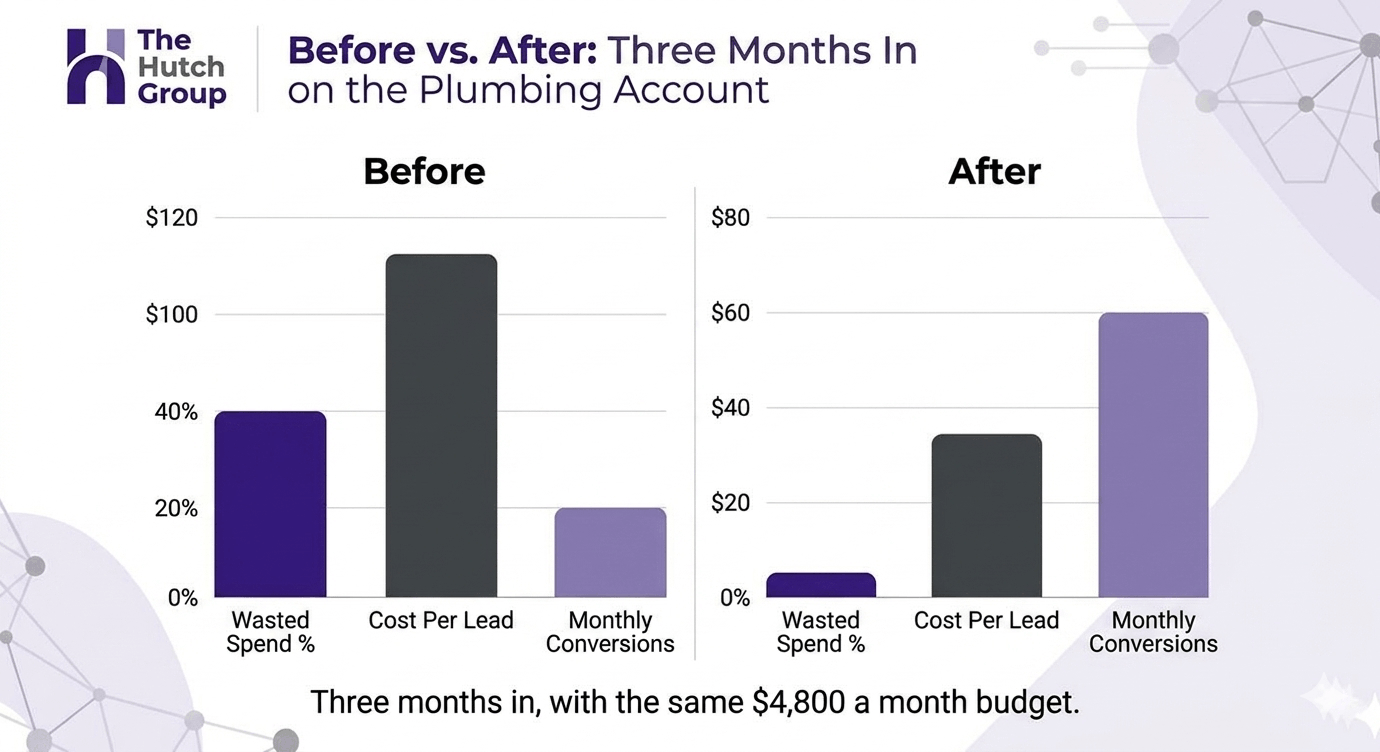
- Wasted spend on irrelevant queries dropped from 38% of budget to 6%
- Cost per lead went from $86 to $51
- Lead-to-install conversion rate held roughly the same, because the leads got cleaner instead of fewer
- Total monthly installs attributed to Google Ads went from 11 to 18
The math is not subtle. We didn’t change the budget. We didn’t rebuild the campaigns. We didn’t even rewrite most of the ads, yet. We just stopped paying Google to send us clicks from people who were never going to buy.
That’s what a real negative keyword list does. It isn’t a one-time setup. It’s a habit.
If you only do one thing this week
Open the search terms report on your highest-spend campaign. Sort by cost, top 30. Read every single one. Anything you wouldn’t pay for if you saw the search live, add as a negative tonight.
You’ll save more money in twenty minutes than most “optimization” work returns in a month.
